What makes the best virtual tour for conference centres? It answers practical questions before it tries to impress. Event planners need more than a glimpse of an attractive room. They need to understand layouts, atmosphere and how spaces might work for their event, even when they can’t visit in person.
Choosing a provider can be difficult when terms such as interactive, immersive and high quality don’t explain exactly what you’ll receive. This guide helps you compare tour options against clear requirements, define the experience your venue needs and prepare a focused brief for a professional provider.
We’ll look at how to present key rooms and configurations, what to check about navigation, mobile performance, hosting and final deliverables, and which technical details need separate confirmation. You’ll also learn how to plan capture around venue operations, agree access and approvals, and address safety before filming begins. The result is a more informed way to commission a tour that gives remote prospects a clearer view of your venue and your team a defined scope to work from.
Key Takeaways
- A virtual tour for conference centres should help remote planners assess spaces, atmosphere and how venue areas connect.
- Separate essential venue information from optional tour features, and confirm available formats and functions with each provider.
- Compare suppliers using a written brief that sets out your audience, intended use, priority spaces and required deliverables.
- Prepare a space inventory, access plan and list of areas to exclude so capture can be coordinated with venue operations and safety requirements.
- Assess whether a provider’s relevant experience, project process and post-production scope fit your venue’s needs, then agree approvals before work begins.
Why a Virtual Tour for a Conference Centre Should Support Venue Decisions
A virtual tour for conference centres gives prospective clients a digital way to explore selected venue spaces before making an enquiry. Its purpose is practical as well as presentational: help event planners picture the rooms, understand how spaces connect and judge whether the setting could suit their event. A useful tour does more than show attractive rooms. It gives viewers a clearer sense of the venue they may be considering.
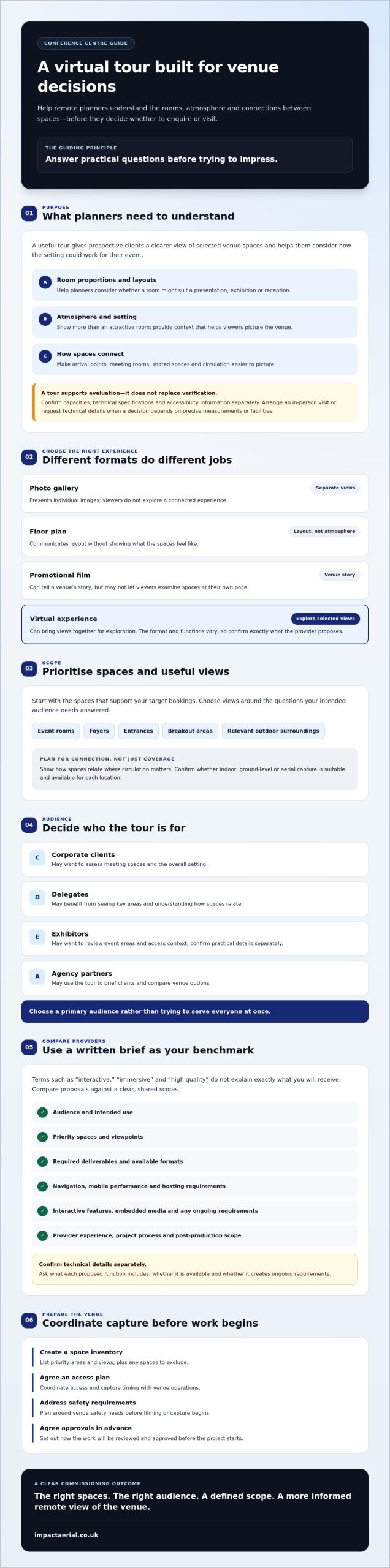
A tour differs from a photo gallery, which presents separate views, and a floor plan, which communicates layout without showing atmosphere. A promotional film can tell a venue’s story, but may not let viewers examine spaces at their own pace. A virtual experience can bring selected views together for exploration, but it isn’t a live site visit. The broader virtual tour format can use different media, so confirm what a provider’s proposed experience includes.
For a visual example of a conference-centre walkthrough, watch this video:
What event planners need to understand from a virtual venue tour
Room proportions and layouts help planners consider whether a space might work for a presentation, exhibition or reception. Views of connected areas can also make circulation easier to picture, from arrival points to meeting rooms and shared spaces. Images alone can’t verify every requirement, however. Planners may still need confirmed capacities, technical specifications and clear accessibility information. Treat the tour as an evaluation aid, then arrange an in-person visit or request technical details when a decision depends on precise measurements or facilities.
Which conference-centre audiences benefit from a tour?
Organisers comparing venues remotely can use a tour to form an initial shortlist and identify questions for the sales team. Other audiences may need different views, so decide who the tour is intended to help rather than trying to serve everyone at once:
- Corporate clients may want to assess meeting spaces and the overall setting.
- Delegates may benefit from seeing key areas and understanding how spaces relate.
- Exhibitors may want to review event areas and access context, with practical details confirmed separately.
- Agency partners may use the tour to brief clients and compare venue options.
A well-planned tour supports informed conversations. It helps each intended audience assess suitability and event flow, while leaving technical verification and final decisions to the appropriate checks.
What a Conference Centre Virtual Tour Can Include
A virtual tour for conference centres should be scoped around the information prospective clients need, not a long list of features that may add little value. Core content usually includes clear views of priority rooms, how spaces connect and enough context to understand arrival and the venue’s surroundings. Optional elements, such as interactive navigation, embedded media or hosted access, depend on the provider and project. Ask what each proposed feature does, whether it is included and whether it creates ongoing requirements.
Different audiences may need different details. An organiser comparing venues may prioritise room layouts and adjoining spaces, while an exhibitor may want to understand event-area access. The Professional Convention Management Association discusses how planners use digital tools for site visits; apply that principle by deciding which views and supporting information will help your own audience assess the venue.
Which spaces and viewpoints should the tour present?
Start with spaces that support the venue’s target bookings. Depending on the brief, these could include event rooms, foyers, entrances, breakout areas and relevant outdoor surroundings. Show connections between spaces where circulation matters, rather than treating every room as an isolated view. Confirm whether indoor, ground-level or aerial capture is suitable and available for each location. An aerial view may help communicate the venue’s wider setting, but it won’t replace a useful view inside an event room.
How to judge image quality and supporting information
Check whether the imagery conveys a room’s character and practical layout without making it difficult to judge scale. Ask the provider to specify the capture approach, expected image quality, post-production scope and final file delivery. Agree who supplies and checks room names, captions, labels and venue details, including capacity or technical information. Establish how those details can be corrected when they change, so outdated information does not remain in circulation.
Before approving a proposal, separate core content from features that need further discussion. Check the scope against a simple list:
- Spaces: Which rooms, entrances and surrounding areas are included or excluded?
- Information: Who provides and verifies labels, captions and supporting venue details?
- Functionality: Are interactive navigation, embedded media, hosting and accessibility features included, and on what terms?
- Delivery: What files will the venue receive, and what post-production or update responsibilities are defined?
For venues considering aerial footage as part of the visual presentation, Impact Aerial’s virtual-tour creation can be discussed as a project option. Confirm the proposed viewpoints, deliverables and any indoor or interactive elements directly with the provider before agreeing the scope.
How to Compare Conference Centre Virtual Tour Providers
Compare proposals against the same written brief, not broad claims such as “immersive” or “high quality”. Set out the intended audience, where the tour will be used, priority spaces and expected deliverables. This makes it easier to see whether a provider understands the venue’s objectives and to compare like with like.
Ask for examples of comparable work, then discuss what each example demonstrates. Does it show a similar type of venue, a clear approach to presenting connected spaces or effective post-production? Request details about who plans and captures the project, who edits the content, how you’ll review it and how revisions and approvals are managed. The technology-enabled event experience can involve more than visuals, so judge proposed features by whether they help your intended audience make a decision.
Get the full scope in writing. Don’t assume that hosting, analytics, future updates or particular interactive functions are included. Confirm what the venue receives, where the tour can be published, who controls access and whether ongoing platform arrangements apply.
Which production credentials and processes should buyers check?
For drone capture, ask who will operate the aircraft and verify relevant pilot qualifications, insurance and proposed operating arrangements. Confirm how access, permissions, the presence of staff or visitors, privacy and safety will be addressed at your site. These checks should reflect the location and planned capture, rather than rely on general assurances. Impact Aerial states that its pilots are CAA GVC certified and that it holds £5m commercial liability insurance. Buyers can also consult this guide to professional drone services in the UK when assessing drone-related supplier credentials.
Will a virtual tour replace an in-person venue visit?
No. A virtual tour for conference centres can help planners evaluate a venue early and prepare focused questions, but it can’t confirm every operational detail. Event-specific needs may require a direct discussion with the venue team or a physical visit, particularly when technical arrangements, access, room configuration or logistics need checking. Use the tour to inform those next steps, not as a substitute for verification.
A practical comparison comes down to fit and clarity. Choose a provider whose process, relevant evidence and written deliverables align with your brief, and make sure any drone work has a suitable, clearly explained operational plan.
How to Brief and Prepare a Conference Centre Virtual Tour
A clear brief helps a provider plan the right capture and helps your team review the result against agreed objectives. For a virtual tour for conference centres, begin by defining its primary purpose, such as supporting initial venue enquiries or presenting spaces to agency partners. Identify the intended audiences, priority booking types and publication channels, such as your venue website or sales materials.
Agree the project boundaries before production starts. Record the deliverables, revision process, approval contacts, ownership arrangements, hosting responsibility and how future updates will be handled. These details clarify what the venue will receive and who is responsible for each stage after capture.
Build a practical production brief
List each requested room and viewpoint, and note the question it should answer. An event-room view might help planners judge layout options, while a foyer view could show how guests move between spaces. Supply current room names, layouts, specifications, approved copy and brand assets. Appoint a lead reviewer and final decision-maker, then agree review dates and how consolidated feedback will be returned.
A space inventory makes the scope easier to check. Include:
- Priority areas: Rooms and views required, plus areas excluded from capture.
- Access: Entry points, staff contacts, restricted locations and any escort arrangements.
- Operational constraints: Venue operating hours, event schedules, setup or reset periods, and times when filming would interrupt activity.
- Approvals: Who checks room details, supporting copy, privacy-sensitive content and the final experience.
Prepare the venue and coordinate production safely
Before capture, confirm how staff, visitors, signage and confidential material will be managed. Identify busy routes and agree how the team will avoid disrupting venue operations. Document permissions and clarify who is responsible for site access, safety coordination and any required approvals. If the project includes aerial filming, discuss suitable viewpoints and operating arrangements with the provider. This guide to professional aerial filming offers further context for planning that part of a project.
Keep the brief and decisions in one shared record, including changes made during review. That gives the venue and provider a consistent reference from planning through post-production, helping prevent misunderstandings about scope or sign-off.
If you’re preparing a project brief, discuss virtual-tour creation with Impact Aerial and outline the spaces, intended use and capture requirements you want considered.
Choosing Impact Aerial for a Conference Centre Virtual Tour
Impact Aerial creates virtual tours using drone-captured content, with project support from initial consultation through post-production. For a conference centre, aerial imagery may help present the venue’s wider setting where suitable. The tour scope should still be based on your priority spaces and intended audience. Confirm indoor, ground-level, interactive, hosting and accessibility features for the specific project rather than assuming they are included.
Supplier credentials are one part of the assessment. Impact Aerial’s pilots are CAA GVC certified, its commercial-grade drones have 4K HDR cameras, and the company holds £5m commercial liability insurance. Consider these details alongside the proposed capture plan, deliverables and how the finished content will be used.
What to discuss with a virtual-tour production provider
Share which audiences the tour should serve, the booking types you want to support and the spaces that matter most. Explain whether the content is intended for your website, sales materials or another channel. Then ask which capture methods and deliverables suit the venue, and identify requested features that need separate confirmation.
Discuss practical arrangements before production is agreed. Confirm access and permissions, safety responsibilities, production stages, review points and final delivery. If aerial views are part of the brief, clarify which viewpoints are suitable and how the provider will plan capture around venue operations. If you’re considering complementary imagery, Impact Aerial’s guide to professional drone photography offers further context on aerial visual content.
Turn your venue requirements into a project enquiry
There isn’t one fixed scope for every conference-centre project. The content and production plan depend on the venue, requested spaces, capture methods and agreed deliverables. Providing a concise outline of your goals, priority areas, access considerations and intended use gives a provider a sound basis to discuss suitability and scope.
Share your venue requirements with Impact Aerial to discuss whether its virtual-tour creation and post-production services fit your project. You can discuss your conference centre project without assuming specific features or formats before they’ve been confirmed.
Make Your Venue Easier to Assess Remotely
A well-planned virtual tour for conference centres should help event planners understand the spaces, how they connect and whether the venue merits a closer look. Define the intended audience and priority areas first, then compare providers using a written brief that sets out capture methods, deliverables, approvals and hosting responsibilities.
Preparation matters too. A clear space inventory, agreed access arrangements and a defined review process help keep production coordinated with venue operations. A tour can support early evaluation, while technical requirements and event-specific details may still need direct confirmation.
Impact Aerial creates virtual tours using drone-captured content and provides post-production support. Its stated credentials include CAA GVC certified pilots, commercial-grade drones with 4K HDR cameras and £5m commercial liability insurance. Share your venue’s goals and requirements to discuss what may suit your project.
Discuss your conference centre virtual tour with Impact Aerial and take the next step towards presenting your venue clearly and confidently.
Frequently Asked Questions
Can a virtual tour replace a site visit to a conference centre?
No, a virtual tour can support early evaluation, but it can’t confirm every detail of an event. Use it to assess how rooms look and connect, then verify event-specific requirements directly with the venue. A site visit or technical discussion may still be needed to check room configuration, access, equipment and operational arrangements. Treat the tour as a way to make those next conversations more focused, not as a substitute for them.
What should a conference centre virtual tour include?
A useful tour should present priority event spaces clearly and help viewers understand their layout, atmosphere and connections to nearby areas. Depending on the venue’s goals, it may also show entrances, foyers, breakout spaces or the surrounding setting. Supporting details such as room names and capacities should be checked for accuracy. Confirm in writing whether navigation, embedded media, hosting and accessibility features are included, as these depend on the provider and project.
How much does a virtual tour for a conference centre cost?
The cost depends on the project scope, including the number and type of spaces, capture methods, post-production and agreed deliverables. Hosting or other platform arrangements may involve separate ongoing terms, so ask whether these are included and who is responsible for them. Request a written proposal that sets out the work, final files, revision process and any continuing charges. This lets your team compare supplier quotes against the same requirements.
How long does it take to create a conference centre virtual tour?
There isn’t a single timeline that applies to every venue. Timing depends on the spaces involved, access arrangements, capture requirements, post-production and how quickly reviews and approvals are completed. Ask each provider to outline the project stages, identify what they need from your team and give a schedule for capture, draft review and final delivery. Confirm how changes to the brief or approval process could affect the agreed schedule.
Can a virtual tour show both indoor event spaces and the venue exterior?
It may be possible to present both, but the capture methods and deliverables need to be agreed for the specific project. Discuss which indoor rooms matter most and whether exterior or wider-setting views would help your intended audience. Ask the provider to confirm what they can capture, how the views will be incorporated and whether requested interactive or accessibility functions are available. Don’t assume one capture method covers every space.
What should I ask a virtual tour provider before commissioning a project?
Ask for examples of comparable work and clarify who plans the capture, completes post-production and manages approvals. Request a written scope covering priority spaces, capture methods, deliverables, revisions, ownership and hosting responsibility. If drone work is proposed, check pilot qualifications, insurance, permissions, access and safety arrangements. Also confirm which features are included rather than assumed, such as analytics, updates, interactive navigation or accessibility options, and who will verify supporting venue information.
Can drone footage be used in a conference centre virtual tour?
Yes, drone-captured content may contribute to a tour, particularly when an aerial view can help communicate the venue’s setting. Its suitability depends on the site, intended viewpoint and project arrangements, so confirm the proposed capture and permissions with the provider. Impact Aerial creates virtual tours using drone-captured content. Its pilots are CAA GVC certified, and the company holds £5m commercial liability insurance.
 2 Norton Drive, Wythall, Birmingham, B47 6HH Company registration number: 11138586. VAT Number: 366 9068 55