A virtual tour for science parks can make a site easier to explore remotely. Southampton Science Park has launched virtual tours of three properties: Gamma House, Kenneth Dibben House and Benham 5. These views give prospective occupiers a way to examine spaces before arranging a visit.
Choosing a science park involves more than comparing buildings on a map. A virtual tour for science parks can show how offices, shared spaces and the wider site relate to one another, especially when you’re assessing options from a distance.
This article looks at examples of virtual tours connected with UK science parks, explains what detailed site views can show and outlines how gigapixel imagery can support exploration. It also explains how to distinguish a panoramic view from a more detailed, navigable experience, and what to consider when planning one for a science park.
Key Takeaways
- Southampton Science Park has virtual tours of three properties: Gamma House, Kenneth Dibben House and Benham 5. See how these examples can help prospective occupiers assess spaces remotely.
- Learn what to look for when exploring whether a tour is self-guided, live or designed for a particular audience, such as schools or businesses.
- Understand how detailed panoramic and gigapixel imagery can help viewers examine a site and its layout from a wider perspective.
- Compare a remote virtual visit with an in-person visit, and identify which site details are easiest to assess online.
- Find out when professional aerial filming and photography can help present a science park’s buildings and grounds clearly.
Which UK science parks offer virtual tours?
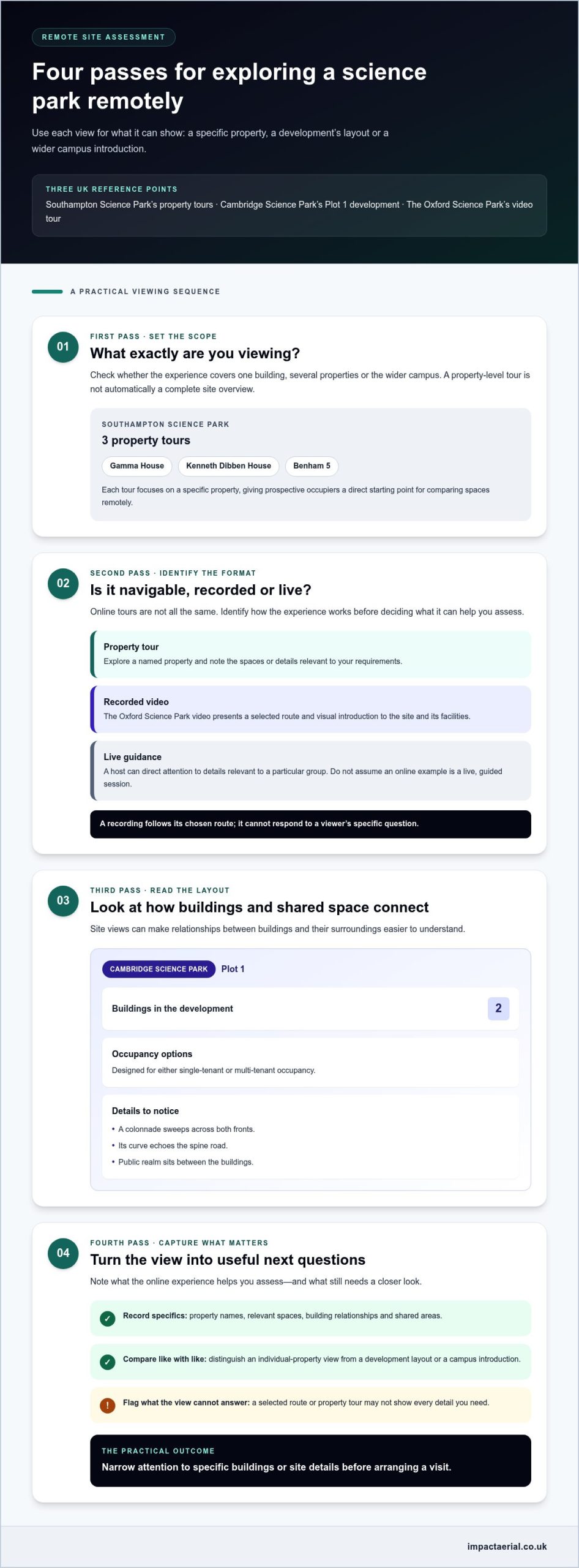
Southampton Science Park launched virtual tours of three properties offering office space for lease: Gamma House, Kenneth Dibben House and Benham 5. These named locations give prospective occupiers a direct starting point for remote exploration. Each tour focuses on a specific property, rather than treating the whole science park as one undifferentiated view. That distinction helps viewers compare individual spaces and decide which locations deserve closer attention.
Other UK examples offer useful context, but not every online site tour is an interactive virtual tour. At Cambridge Science Park, the Plot 1 project comprises two buildings, designed for either single-tenant or multi-tenant occupancy. The Oxford Science Park is also presented through a video tour, which shows the site and its facilities.
To see how a video tour can present a science park, watch this tour of The Oxford Science Park:
Southampton Science Park: three property tours
Situation: A prospective occupier may want to compare leaseable offices before visiting in person. Southampton Science Park’s three property tours cover Gamma House, Kenneth Dibben House and Benham 5. Action: View each property separately and note the spaces or details relevant to your requirements. Result: You can narrow your shortlist to specific buildings, rather than relying only on a general description of the park.
The three-property example also shows why a tour’s scope matters. A tour of Gamma House answers questions about that property, while a park-wide view would need to show how locations relate across the wider site. When comparing online experiences, identify whether the content represents one building, several properties or the whole campus. This distinction helps prevent a property-level tour from being mistaken for a complete site overview.
Cambridge Science Park: understanding the Plot 1 layout
Situation: Plot 1 at Cambridge Science Park comprises two buildings. Action: Consider the relationship between the buildings, their intended occupancy options and the shared space between them. A colonnade sweeps across both fronts, echoing the curve of the spine road. New public realm has also been created between the buildings. Result: These features provide concrete points to look for when assessing how a development’s architecture and external spaces fit together.
The Plot 1 facts describe the project, not a virtual tour offering. They still show what a useful site view could help explain: the connection between two buildings, the curve followed by the colonnade, and the public realm between them. Single-tenant or multi-tenant occupancy also gives viewers a practical lens for considering how the buildings may be used. Keep those elements distinct from the tour format itself.
Oxford: a video view of park operations
The Oxford Science Park video tour features Dinah Rose KC, President of Magdalen, and offers a guided visual introduction to the site. Unlike a navigable property tour, a video presents a selected route and sequence. Viewers can see how facilities and the campus environment are presented, while recognising that the film follows a chosen perspective.
Together, Southampton, Cambridge and Oxford illustrate three different reference points: named property tours, a two-building development and a video-led site presentation. When planning a virtual tour for science parks, first decide whether viewers need to inspect individual offices, understand a development’s layout or gain an introduction to campus operations. That purpose determines which site details matter and whether a property tour, wider site view or guided video is the most relevant format.
Do UK science parks offer live or guided virtual tours for schools and businesses?
UK science park examples include online property tours and recorded video, but these formats aren’t automatically live, guided sessions. The Oxford Science Park video tour, for example, presents a selected view of the site. A virtual experience can support schools and businesses, but its value depends on the audience, route and information presented. Identify whether the experience is self-guided, recorded or led by a host before deciding what it can help you assess.
What a recorded tour can show
The Oxford Science Park video provides a named example of a guided visual presentation. A recorded route can introduce buildings, facilities and the campus environment in a clear sequence. Viewers can pause and revisit sections, making it suitable for independent preparation or classroom discussion. But a recording follows its chosen route; it cannot respond to a pupil’s question about a particular facility or a business visitor’s interest in a specific part of the site.
For schools, turn the video into a focused learning activity. Before viewing, give pupils a task, such as identifying how buildings and shared spaces connect. During playback, pause at relevant points and ask learners to record observations. Afterwards, discuss what the video shows and what its camera route cannot explain. This uses the Oxford example as a visual prompt without treating it as a live lesson.
How schools and businesses can use live guidance
A live guided tour serves a different purpose: a host can direct attention to details that matter to a particular group. For a school visit, plan a route around visible features, such as entrances, landscaped areas or shared spaces. For a business audience, focus on building access and how facilities relate to the site layout. These are suggested content priorities, not claims about a standard programme offered by every UK science park.
Before a live session, set a clear agenda and choose the places viewers need to understand. A school group might follow a simple observe-and-discuss sequence. A business group might compare a building’s external setting with the surrounding campus. The guide should identify each location on screen, explain why it matters to the audience and leave time for questions. This structure keeps the tour relevant without assuming every viewer has the same objective.
- For schools: Set a learning prompt, such as mapping how buildings relate to shared outdoor areas.
- For businesses: Prepare questions about the particular property, facilities or wider site context.
- For either audience: Separate what the camera shows from details that require explanation.
These steps help viewers get more from a recorded tour or live presentation. They also clarify the formats’ differences: a recording offers a consistent route, while a live guide can adapt the explanation to questions. This matters when planning a virtual tour for science parks, because schools and businesses may need different information from the same site.
For a site-focused visual presentation, explore ways to present a science park visually as part of planning the experience.
Take virtual
Taking a virtual tour works best with a clear purpose and a short checklist. For a science park, the purpose might be understanding the campus layout, assessing a building’s setting or preparing for a future visit. A virtual tour for science parks is more useful when viewers know what they need to find before opening the first view.
Prepare before opening the tour
Start by writing down the decision the tour should support. A business assessing potential premises may prioritise entrances, surrounding buildings and visible shared spaces. A school group could focus on how the campus is arranged and which facilities appear along the route. Keep questions specific: “Where is this building in relation to the main road?” is easier to answer than “What is the site like?”
Next, open a site map or location plan if the tour provides one. Use it to understand orientation before moving between viewpoints. If no map appears, note visible landmarks, such as a distinctive entrance or curved road, to keep track of your location. The aim is to build a mental picture of the site, not to assume every room or route is visible.
Explore in a deliberate sequence
Move through the experience in a consistent order. Begin with the widest site view, then inspect individual buildings and nearby outdoor areas. Finish by revisiting locations tied to your original questions. This sequence connects the overall layout with specific details, rather than leaving viewers with isolated images and no sense of where they fit.
- Orient yourself: Find the main entrance, central route or clearest landmark.
- Follow one route: Move between connected viewpoints without skipping location changes.
- Inspect relevant details: Pause on entrances, building fronts and visible shared areas.
- Review your notes: Compare what you saw with the questions written beforehand.
At each viewpoint, distinguish observation from interpretation. You may see a building entrance, for example, but the image alone might not explain access arrangements. Record what the view shows separately from questions that need further information. This simple note-taking method keeps conclusions grounded in what is visible.
Use detail without losing the wider view
Gigapixel imagery can support close inspection within a larger scene. Viewers can move from an overall panorama towards finer visual detail, then zoom back out to recover context. Use this movement purposefully: inspect a feature, note its position and return to the broader view. Zooming in without checking the surrounding scene can make a detail seem disconnected from the campus.
Other virtual experiences show how different image formats serve different tasks. The Machu Picchu virtual tour uses 360 photos, while the Great Wall tour uses 360 photographs. These examples illustrate how a viewer can look around a captured scene, rather than follow only one fixed camera direction. For a science park, that perspective can help viewers examine visible surroundings, while a site plan or route provides orientation.
Finish by summarising three points: what the tour clearly showed, which locations matter most and what questions remain. For a school visit, pupils could describe one route and one visible feature. For a business review, viewers could shortlist relevant areas for closer consideration. This final step turns online exploration into a practical record, rather than a sequence of quickly forgotten views.
Virtual visit
A virtual visit can help viewers understand a place before travelling there. For a science park, its value depends on how clearly the experience connects individual views with the wider site. A panorama may show the surrounding campus, while closer views reveal building details. Keep those perspectives connected, rather than treating each image as a separate destination.
Move between the wide view and fine detail
Start with the widest available view. Locate the entrance, main routes and buildings before zooming into individual areas. Then choose a destination, inspect its visible features and return to the broader scene. This cycle helps viewers understand where a detail sits within the site. At a science park, for example, a close view of a building makes more sense when its position relates to nearby roads or shared spaces.
Gigapixel imagery supports this exploration by letting viewers examine detail within a larger image. The practical task is to manage the change in scale. Zoom in to inspect a feature, note its location, then zoom out to restore context. This can help compare visible entrances or building fronts, but the image should not be treated as a floor plan or a complete record of every space. When projects require true spatial measurement alongside visual walk-throughs, organisations often look to geospatial mapping firms such as GEOTECH 3D to capture high-precision site data.
The Moon virtual tour offers a striking example of how large-scale digital imagery can support remote exploration. It was created using data collected over the past 11 years. Its subject differs from a UK science park, but the viewing principle is relevant: move between the broad scene and details, keeping location in mind.
Use a virtual visit to prepare questions
Situation: a prospective occupier is considering a science park from a distance. Action: record visible details and questions while moving through the tour. Result: the viewer can focus a later discussion or visit on specific buildings and features. Separate observations from assumptions. A visible entrance is an observation; the image alone may not explain how people access the building.
A practical note can use three columns: location, what the view shows and what needs explaining. For example, “north entrance” identifies a location, “covered entrance visible” records an observation, and “access route to shared facilities” captures a question. This method keeps a virtual visit useful for business planning without treating imagery as a substitute for operational information.
Schools can use a similar method with a learning prompt. Ask pupils to identify a route between two visible landmarks, then explain which image helped them understand the layout. The Science Museum Group collection contains over 325,000 objects and archives, showing how digital viewing can provide a starting point for exploring complex subjects. A science park visit can likewise prompt questions about buildings, research environments and how a campus is organised.
NASA’s Curiosity Rover has captured hundreds of thousands of pictures on Mars. This example shows how images can help people explore places they cannot readily visit. For a UK science park, the goal is more focused: use the virtual experience to understand visible site relationships, identify areas of interest and prepare targeted questions.
If you’re planning a detailed remote view of a site, plan a virtual site view that helps viewers explore its layout and visible features.
In a classroom exercise, pupils can trace a route between visible places and explain what they notice along the way. Encourage them to distinguish what the image shows from what they infer, then turn uncertainties into questions for discussion. This approach helps pupils consider how a site is arranged without assuming every part is visible.
The Natural History Museum attracts millions of visitors each year. A virtual visit can prompt discussion about how imagery helps people explore a place before arriving. Viewers can compare broad views with close details, record observations and identify what they would want to learn in person. This keeps the tour focused on exploration while leaving practical questions open for follow-up.
Impact Aerial: Aerial Filming and Photography
Impact Aerial provides Aerial Filming and Photography for organisations that need clear aerial views of their sites. This can help science parks present buildings, access routes and surrounding grounds in a single visual context. It’s a practical next step when existing online views don’t show the wider site perspective prospective occupiers, visitors or stakeholders need.
Impact Aerial uses commercial-grade professional drones equipped with 4K HDR cameras. These capabilities support professional aerial capture, while the planned views should reflect the site’s purpose and the features viewers need to understand.
To discuss aerial filming and photography for a science park site, contact Impact Aerial.
Plan the view around your next decision
The strongest next step is to define what your audience needs to understand, then shape the imagery around that purpose. A virtual tour for science parks can present a campus as a connected place, not just a collection of separate buildings. Consider which viewpoints will make the site easier to assess and what context viewers need before exploring its details.
Impact Aerial also provides PV Solar Farm Thermal Surveys and Drone Commercial Property Surveys. These services address different project needs, while aerial filming and photography can help organisations communicate a site visually. Choose an approach by considering how the finished material will be used and which areas matter most to its audience.
If you’re planning aerial visuals for a science park or commercial property, contact Impact Aerial to discuss your project. A clear project brief is a practical starting point for developing a focused view of your site.
 2 Norton Drive, Wythall, Birmingham, B47 6HH Company registration number: 11138586. VAT Number: 366 9068 55