Dental anxiety affects an estimated 36% of the population to varying degrees, so seeing a clinic before an appointment can make the visit feel more familiar. A virtual tour for private clinics lets patients explore spaces such as reception areas, waiting rooms and consultation rooms before they arrive. It can also help them understand the entrance and available facilities in advance.
Patients often want to know what a clinic feels like before they walk through its doors. A virtual tour for private clinics can answer practical questions and show the environment without replacing the personal guidance of a clinical team.
This guide explains how clinic tours can build confidence, which spaces to include in dental clinics, GP surgeries and specialist practices, and how to prepare those areas for photography. It also compares bespoke, Matterport and Google Street View formats, then covers where to publish a tour so patients can find it when planning a visit.
Key Takeaways
- Choose clinic spaces that answer patients’ practical questions, while keeping restricted or sensitive areas out of public view.
- Plan the route with clinic staff, then prepare each visible area by checking signage and removing private information.
- Match the tour format to its purpose: bespoke tours support custom navigation, while other formats suit different discovery needs.
- Publish the finished tour where patients make decisions, including the clinic website, Google Business Profile and booking emails.
- Use professional virtual tour creation when you need a carefully planned visual presentation of your clinic’s spaces.
Why Virtual Tours Work for Health Clinics?
A 360 virtual tour lets patients preview a clinic before their appointment. They can see reception, waiting areas and consultation rooms, reducing uncertainty about arrival. Dental anxiety affects an estimated 36% of the population to varying degrees. A familiar visual route can make an unfamiliar setting feel easier to approach.
Before a first visit, practical details matter: where the entrance is, what the waiting room looks like and how patients move between spaces. A tour can answer these questions before someone travels. It also gives family members a clearer picture of the setting before they support a patient’s admission.
For a practical overview of camera setup and spatial planning, watch this helpful video:
Reassurance comes from showing real details, not making broad promises. Patients can inspect the entrance, locate reception and view the route to a consultation room. For someone attending a specialist clinic, a preview of treatment spaces or rehabilitation areas can replace some unknowns with useful visual context.
Appointment attendance is another reason clinics consider tours. Healthcare facilities implementing 360° tours typically report a 15-25% reduction in new-patient no-shows within 90 days. The tour is one part of the patient journey: it can clarify what arrival involves, while appointment reminders and clear booking information provide separate support.
Use the tour to make key details easy to find:
- Show the main entrance and the path to reception.
- Include the waiting area patients will use before an appointment.
- Preview a consultation or treatment room where appropriate.
- Identify features that help visitors orient themselves, such as clear signs.
For people preparing for admission, a guided view can help them recognise the entrance and understand the immediate surroundings. Family members can also review the environment beforehand. This visual orientation supports preparation, but it doesn’t replace information from the clinic team about an individual’s care.
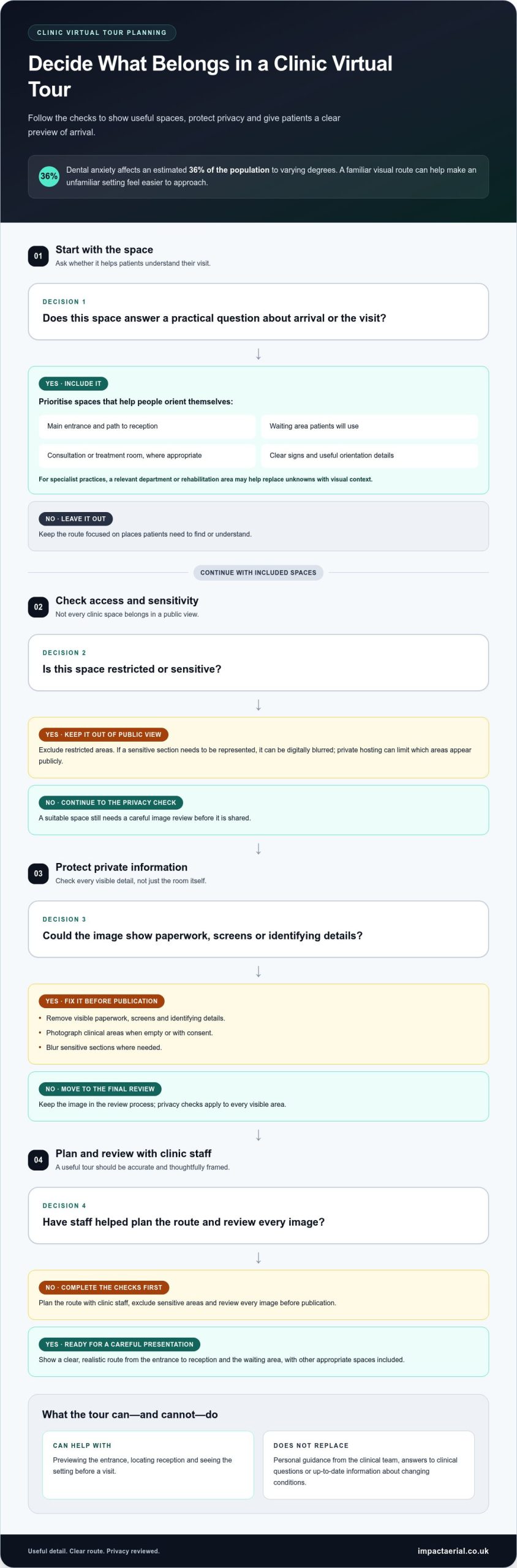
There are risks and limitations: a tour can expose private information or show spaces that should remain restricted, and it can’t answer clinical questions or reflect changing conditions in real time. Clinics should plan the route with staff, exclude sensitive areas and review every image before publication.
Privacy deserves attention at every stage of filming. Remove visible paperwork, screens and identifying details, and photograph clinical areas when empty or with consent. Sensitive sections can be digitally blurred, while private hosting can limit which areas appear publicly. These steps help clinics present a useful visual experience without exposing unnecessary information.
Trust grows when the published tour is accurate and thoughtfully framed. A clear route from the entrance to reception, followed by a view of the waiting room, sets realistic expectations. For patients experiencing anxiety, that preview can make a first visit feel more familiar, while clinic staff remain the source for personal and clinical guidance.
Publishing tours on Google Business Profile, websites and booking emails
Make the tour easy to find wherever patients prepare for a visit. Add it to the clinic website, share it on social media and include it on the Google Business Profile. For clinics looking to expand their reach across digital platforms, working with a specialist team like Web Bridge can help turn visual assets into effective online campaigns. Each placement serves a different moment: a website visitor may be comparing facilities, while someone opening a booking email is preparing for an appointment.
A complete Google Business Profile can strengthen how people assess a facility. According to Google guidance, customers are 2.7 times more likely to consider a business reputable when its profile is complete, and 70% more likely to visit. A virtual tour complements accurate opening details, contact information and directions by showing patients what the premises look like.
On the website, place the tour near practical visit information, such as the appointment booking page, directions or accessibility details. Label it clearly, for example, “Explore our reception and consultation rooms”. Check that it opens smoothly on both phones and desktop computers; if your practice needs assistance with mobile responsiveness or custom embedding, web design specialists such as thinktank.co.za can help. Patients using a small screen should still be able to navigate between spaces without losing their place.
Booking emails offer a useful, timely place for a tour. Add a short invitation beside the appointment date and arrival instructions, rather than burying it in a general newsletter. Patients can preview a dental reception, waiting area or treatment room while checking where to go. For hospitals, the same approach can introduce a department or admission entrance before a planned visit.
Consider patients with autism or sensory sensitivities when presenting the tour. A predictable route and clear room labels can help users understand what they’ll encounter. Avoid flashing effects, unnecessary sound and abrupt transitions. Pair the interactive view with a concise text description, so people who find moving imagery uncomfortable can still access essential arrival information.
Accessibility also depends on the surrounding page. Use descriptive link text, readable contrast and a clear way to return to appointment details. Keep directions available outside the tour, since not every patient will use interactive content. Dental practices can identify the entrance and reception; a specialist facility can guide visitors towards the relevant department without exposing staff-only spaces.
- Place the tour beside directions or appointment information on the clinic website.
- Use a direct, descriptive invitation in booking emails.
- Keep the Google profile accurate and make the tour easy to locate.
- Offer a text route summary alongside interactive imagery.
Review each placement after publication: test the links, check the tour on mobile, and confirm that the first view shows a useful orientation point. If your clinic needs a carefully produced interactive presentation, explore professional virtual tour creation as a practical next step.
What to photograph in dental clinics, GP surgeries and specialist clinics
Choose views that help patients understand arrival, movement through the building and the spaces they’ll use. A short route from the entrance to reception gives the tour a clear purpose.
Planning the Clinic Photography Session
Start with a discreet site survey alongside clinic staff. Map the public route, identify restricted rooms and note equipment or displays that must stay outside the frame. Before photography, tidy visible surfaces, check signs and remove paperwork, names, computer screens or appointment details. A photography notice displayed at least 24 hours before the shoot can alert people using the clinic.
Agree the route and image list in advance. For a dental practice, this might include the entrance, reception, waiting area and an empty treatment room. For a GP surgery, consider the route to consultation rooms. Specialist clinics can select spaces that explain their service without exposing staff-only areas.
Working Around Clinical Activity
Schedule photography before opening, between appointments or outside clinical hours to limit disruption. If a clinical space must be photographed during activity, obtain consent from anyone identifiable and keep the route clear. Empty rooms usually provide a straightforward view of layouts, seating and equipment without capturing patients or interrupting care.
Ask a named staff member to coordinate access on the day. They can pause entry to the area being photographed, remove private information and confirm that restricted equipment stays out of view. For example, reception staff can check that appointment lists or patient records aren’t visible on a desk.
Selecting Views and Tour Routes
Plan each 360° view where visitors need to make a decision or understand their location. Begin at the public entrance, then show reception, the waiting space and relevant consultation or treatment rooms. Keep the sequence logical: patients should be able to follow the same route they’ll take when they arrive, rather than jump between unrelated spaces.
A phone mounted on a stable tripod at a height of 1.5 metres is recommended for a healthcare tour. Check that each capture includes the main signs and doorways, while avoiding confidential documents and screens. A final route review with clinic staff can catch missing turns or views that reveal restricted areas.
Build the image list around what each type of clinic needs to showcase:
- Dental clinic: entrance, reception, waiting area and an empty treatment room.
- GP surgery: public entrance, reception desk, waiting space and consultation-room approach.
- Specialist clinic: relevant treatment or rehabilitation spaces, plus signs that guide visitors.
Before publishing, review every 360° image for visible patient information, staff-only equipment and people in the background. If a room’s layout changes, update its view so the tour remains a useful guide to the spaces patients will actually see.
Choosing between bespoke, Matterport and Google Street View
Choose a format by deciding what patients need to do: find the clinic, understand its layout or explore specific spaces. For a private clinic, compare navigation, public visibility, privacy controls and how easily the tour fits into existing patient information.
A bespoke tour suits a patient-facing journey that needs custom navigation or information points. It can guide visitors from the entrance to reception, then highlight a consultation room or surgical centre. Healthcare tours are often bespoke when they need hotspots, tailored routes or accessibility features such as screen-reader support. This format is useful when a clinic wants control over what visitors see and in what order.
Matterport is a strong option when the priority is an immersive walkthrough of connected spaces. Visitors can move through the facility rather than view isolated photographs. Consider whether a broad spatial overview serves the clinic’s purpose or whether patients need a carefully directed route. A tour of a whole building, for example, may be less useful than a focused journey to the relevant department.
Google Street View suits discovery through Google Maps and a clinic’s business profile. It places the visual experience alongside local information patients may already use to find the entrance or check clinic details. Google research found that listings with a virtual tour were twice as likely to generate interest. This supports using a tour as part of a complete online presence, not as a substitute for accurate opening information.
Google guidance states that a complete Google Business Profile makes customers 2.7 times more likely to consider a business reputable and 70% more likely to visit. Keep the profile details accurate, then make the tour easy to find beside the clinic’s location and contact information. A profile helps patients discover a facility in Google Search or Maps, while the tour gives them a visual preview once they find it.
Use these questions to narrow the choice:
- Need a guided patient journey? Choose bespoke navigation and relevant hotspots.
- Need an immersive overview? Consider a connected walkthrough of the facility.
- Need map-based discovery? Prioritise a tour linked with Google Maps and the business profile.
- Need to protect sensitive spaces? Select a format and publishing approach that keeps restricted areas private.
For a clinic with several departments, a bespoke route can direct visitors towards the right centre without exposing staff-only areas. A single-site dental practice may benefit more from clear Google Maps discovery and a concise preview from reception to the treatment room. In either case, check the tour on mobile and desktop before publication, and ensure the first view identifies the clinic clearly.
Google visibility depends on a useful, complete profile and relevant information. A tour helps people assess the premises, but it doesn’t replace clear directions, contact details or clinic-specific information. Match the format to the patient’s task, then publish it where that task begins.
Areas to include in a healthcare virtual tour
A useful healthcare tour follows the patient’s journey, from finding the entrance to reaching the relevant room. Select views that explain how the facility works, rather than trying to display every space inside it.
Start with the exterior approach and public entrance. Show the door patients should use, nearby signs and the route towards reception. If a clinic has more than one entrance, make the correct one clear in the opening view. This helps visitors orient themselves before they arrive and reduces confusion at the building.
Reception and waiting areas belong in most patient-facing tours. Show the reception desk, seating, visible wayfinding and the route from the entrance. Present a modern waiting room accurately, without staging it to look unlike the space patients will actually use. Keep screens, papers and booking lists out of view.
Continue along the public route to spaces relevant to the clinic’s work. For a dental practice, that may mean an empty treatment room. A GP surgery could show the approach to consultation rooms, while a physiotherapy clinic may include its rehabilitation area. Each view should help patients understand where they’re going, not reveal clinical activity or confidential details.
- Arrival: public approach, entrance and directions to reception.
- Waiting: seating, reception and clear signs for the next step.
- Care spaces: suitable consultation, treatment or rehabilitation rooms.
- Accessibility context: visible routes, doorways and changes in level.
Plan the route around patient questions. Can a first-time visitor identify the correct entrance? Can someone see how to reach the waiting area? Does a patient attending a specialist appointment understand which corridor leads to the relevant department? These practical checks help determine which locations merit a 360° view and which add little to the journey.
Some spaces should remain outside a public tour. Exclude staff rooms, storage areas, active clinical encounters and rooms containing records or identifying information. Review reflective surfaces, computer displays and noticeboards too, since confidential details can appear in the background. If a sensitive area is essential to show, limit the view and remove identifying content before publication.
Include only spaces that support patient orientation or explain the care environment. A planned admission tour might show the public entrance, reception and relevant department, while leaving clinical procedures and private rooms out. Review the finished route with staff, then check that every view matches the signs and layout patients will encounter.
To plan and produce a coherent clinic walkthrough, arrange professional virtual tour creation for the spaces patients need to see.
Impact Aerial: Aerial Filming and Photography
Impact Aerial can provide aerial filming and photography to show a clinic’s building, grounds or wider location. This can add context beyond the interior tour, such as helping patients recognise a large site or understand its setting. Aerial imagery complements an indoor walkthrough, but doesn’t replace views of reception, waiting areas or treatment rooms.
For projects where an aerial perspective is appropriate, Impact Aerial uses advanced professional drones equipped with high-resolution 4K HDR cameras. These capabilities support carefully produced visual content, with the scope shaped around the project’s purpose.
To discuss aerial filming or photography for your clinic, contact Impact Aerial.
Make your clinic’s next step clear
Before commissioning a virtual tour for private clinics, decide what patients should understand after viewing it. A clear objective helps shape the route, select the spaces to show and keep sensitive areas private. Consider how the tour will fit alongside appointment information, directions and the clinic’s existing website.
Impact Aerial creates virtual tours and provides post-production services, helping turn planned clinic imagery into a finished visual experience. Its other services include Aerial Filming and Photography, PV Solar Farm Thermal Surveys and Drone Commercial Property Surveys. For a clinic, the next step is to discuss the tour’s purpose, spaces and intended audience.
A well-planned visual guide can give prospective patients a clearer sense of the environment before they visit. Keep the focus on useful orientation and an accurate impression of the clinic.
Contact Impact Aerial about your clinic tour to discuss the next step. A considered plan can help your clinic present its spaces with clarity and care.
Frequently Asked Questions
What is a virtual tour for a private clinic and how does it work?
A virtual tour is an interactive visual presentation that lets someone explore clinic spaces remotely. Viewers move between linked panoramic scenes using screen controls such as arrows or room labels. A private clinic might connect its entrance, reception and a consultation room in one navigable experience. The tour gives prospective patients a visual preview, while appointment details and clinical advice remain available through the clinic’s usual channels.
What are the benefits of virtual tours for private clinics in the UK?
Virtual tours help people understand the setting before travelling, making arrival feel more predictable. They can also show practical details, such as the location of reception or how to reach a department. For a UK clinic serving patients from different communities, a tour can support clear wayfinding alongside written directions. It gives families and prospective patients another way to become familiar with the premises before a visit.
How do you create and publish a virtual tour for a private clinic?
Begin by defining the patient journey the tour should explain, then map the rooms and transitions that support it. Agree access and privacy arrangements with clinic staff, capture the selected spaces and review the assembled tour before publication. For example, a specialist practice could make the route from its public entrance to the relevant department easy to follow. Publish the finished experience on the clinic website and Google Business Profile.
What equipment and software are needed to make a clinic virtual tour?
At minimum, you need a device capable of capturing panoramic images, stable support and software that can assemble and publish the tour. A phone on a stable tripod can be used for healthcare tour photography, with the camera positioned consistently between scenes. A dedicated 360-degree camera is another capture option. The required software depends on whether you need a simple linked panorama or a more interactive experience with navigation points.
How can a clinic protect patient confidentiality during virtual tour photography?
Photograph empty spaces wherever practical, and arrange consent before including identifiable people. Before capture, remove appointment lists, paperwork and patient details from desks; turn screens away or switch them off. Ask a staff member to review each scene for reflections, noticeboards and visible records. Keep restricted rooms out of the public route, and blur sensitive details that remain visible in a selected view.
How can virtual tours be embedded on a clinic website and shown on Google Maps?
For a website, add the tour to a relevant page using the embed option supplied by its hosting platform, then test it on mobile and desktop. For Google Maps discovery, associate the tour with the clinic’s Google Business Profile so viewers can explore it alongside the location. Check that the profile identifies the correct premises and that the tour opens at a useful orientation point.
What accessibility requirements should a private clinic virtual tour meet in the UK?
Make the tour straightforward to navigate, and provide a text alternative describing essential route information. Use clear room labels, visible controls and a predictable sequence. Avoid relying on colour alone to distinguish directions, and ensure visitors can find written directions without completing the tour. These practical choices can support people using assistive technology or those who prefer static information. Keep accessibility details accurate to the spaces shown.
 2 Norton Drive, Wythall, Birmingham, B47 6HH Company registration number: 11138586. VAT Number: 366 9068 55